Subtitle Editor
Frame-accurate cue review with timing tools.
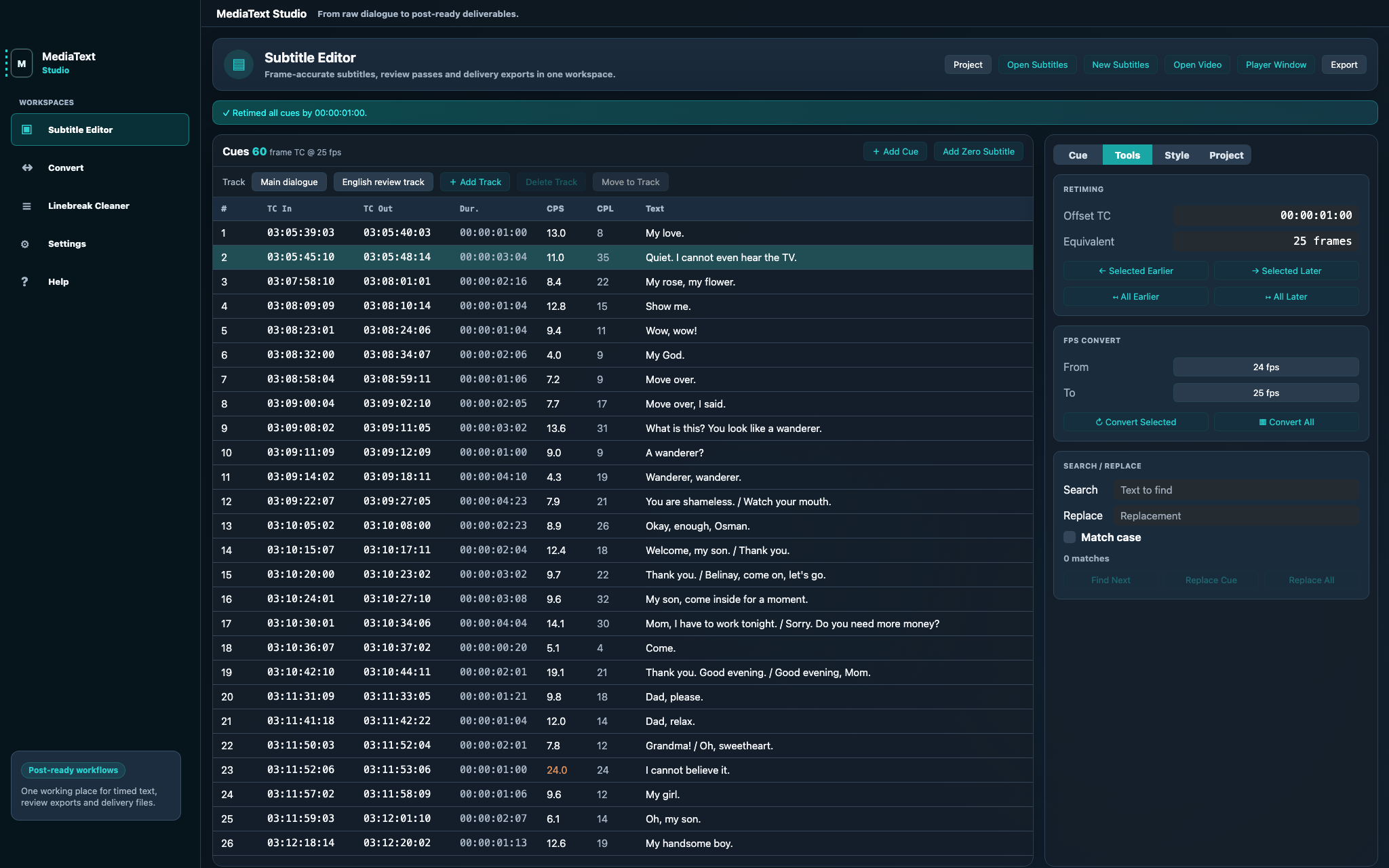
Review cue timing, reading speed, line length and track selection while adjusting subtitles against picture and waveform.

From raw dialogue to post-ready deliverables
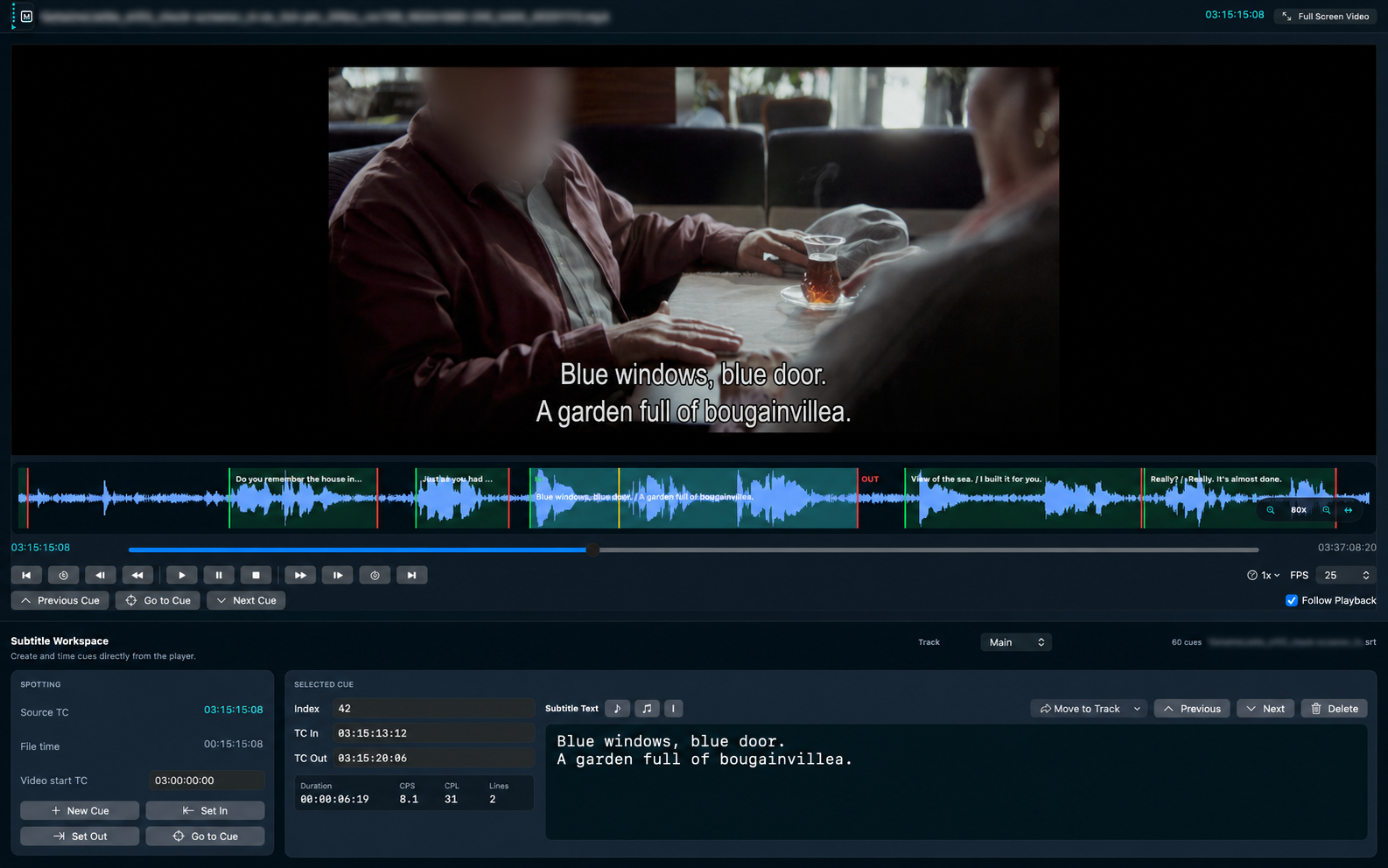
MediaText Studio is a native Mac workspace for subtitle editing, waveform spotting, timed-text conversion and delivery exports. Keep video reference, tracks, source timecode, QC warnings and review files in one local project, without uploading production media.
Product
Spoken-media work gets messy when subtitles, captions, revision notes, delivery specs and reviewer comments are handled in separate tools. MediaText Studio keeps the timed-text layer controlled, inspectable and close to picture.
Version 1.0 focuses on practical production work: subtitle editing, conversion, project save/open, linebreak cleanup, frame-based timing, waveform-assisted spotting, quality warnings, review documents and video exports for Mac-based post teams that need local file control.
Interface
The editor, conversion preview and delivery settings stay in one native Mac workspace, so timing decisions, quality checks and export choices remain visible instead of hidden across separate apps.
Review cue timing, reading speed, line length and track selection while adjusting subtitles against picture and waveform.
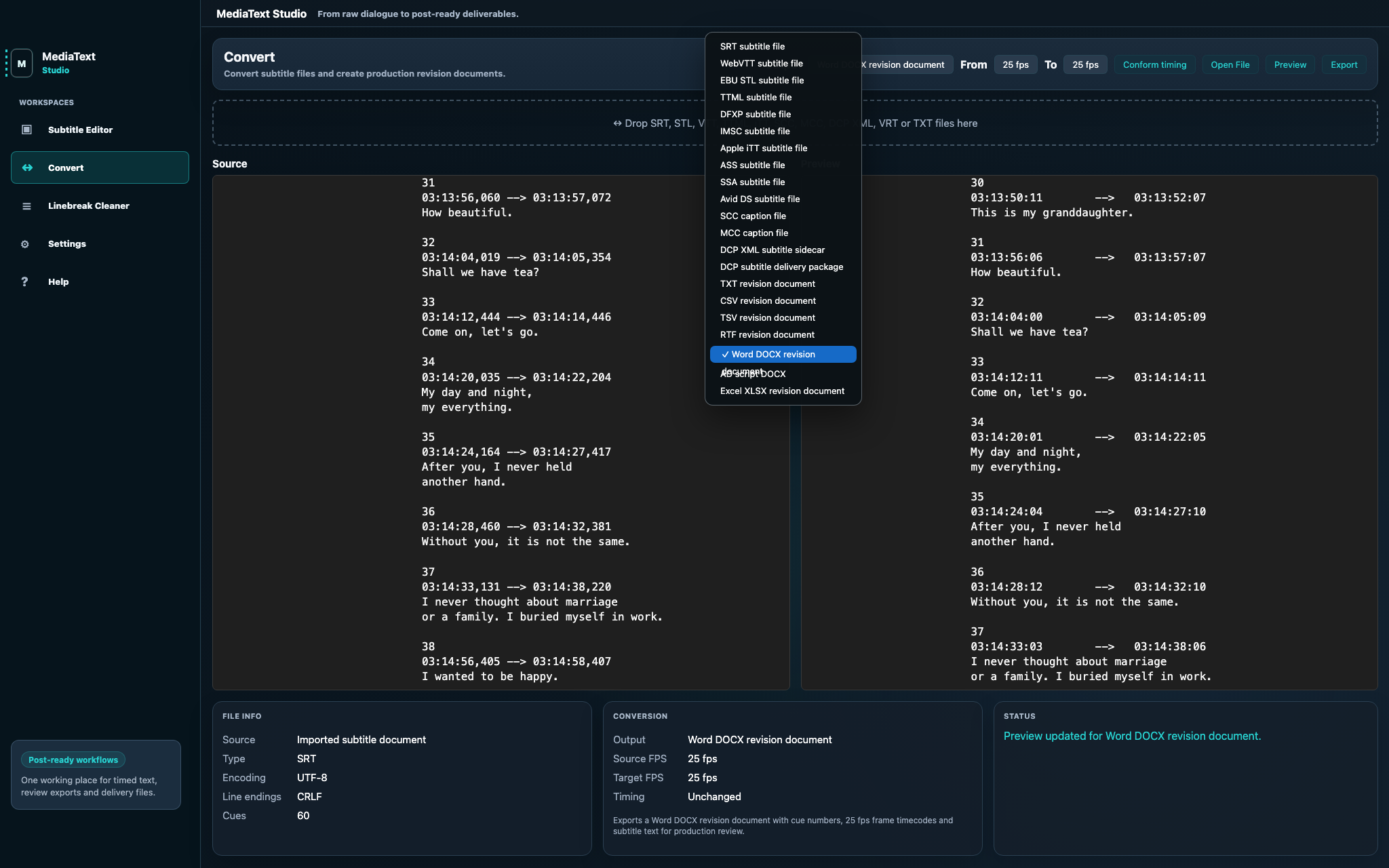
Convert subtitle files into review documents and delivery formats with source and preview text visible before export.
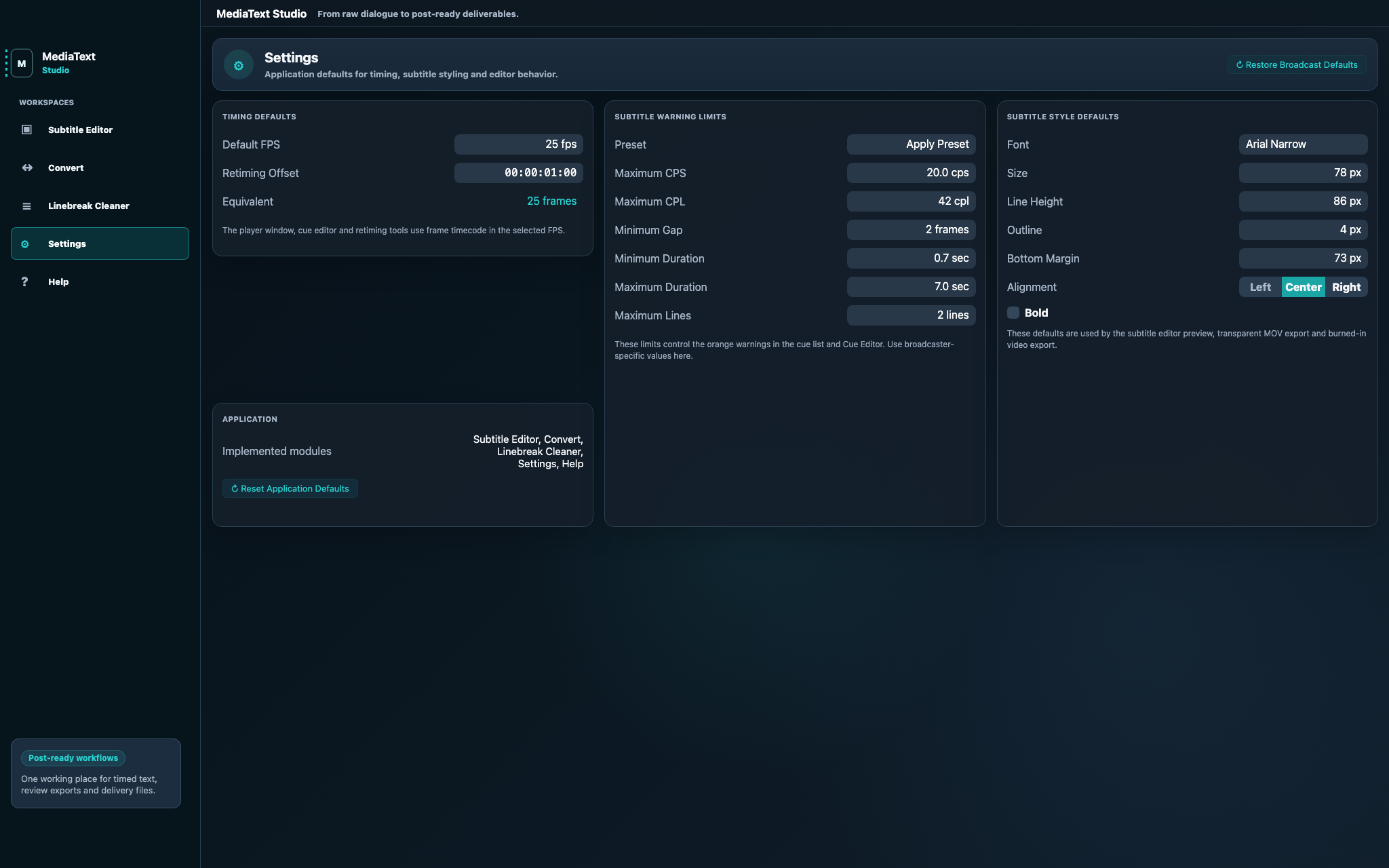
Store warning limits, frame-rate defaults and subtitle styling before preview or video export.
Controlled Delivery
A local, review-first workflow for checking, correcting and exporting timed text before handoff.
Load source media, an existing subtitle file or a saved project in the same local workspace.
Set project FPS and video start TC so cue timing matches the required delivery timebase.
Create, move and trim cue timing while checking picture, playhead, waveform and nearby cues.
Check CPS, CPL, gaps and durations, then create DOCX, AD Script DOCX, XLSX, RTF, TXT, CSV or TSV review files.
Export SRT, VTT, EBU STL, Spruce STL, SBV, LRC, SAMI/SMI, MicroDVD, TTML, iTT, DCP subtitle packages, alpha overlays or burned-in video where required.
Annotation Edit Alternative
Many professional subtitlers and post teams built reliable workflows around Annotation Edit. MediaText Studio is designed to fill that gap: a native macOS subtitle editor and timed-text workspace for people who need familiar professional control in a current Mac environment.
Read the Annotation Edit migration notesWorkflows
MediaText Studio is for production companies, documentary teams, editors, subtitlers, caption editors, localization teams and educators who need clean handoff, local control and a dependable Mac workflow.
View the workflow routesKeep project files, warning presets, revision exports and delivery notes traceable through review rounds.
Find dialogue and keep timed text aligned with picture using player controls, source timecode and waveform context.
Keep human judgment central: timing, line breaks, CPS, duration, SDH details, italics and final readability.
Create readable scripts and review files with cue numbers, frame-based timecodes and cleaned line breaks.
Formats
The trust layer is export quality. MediaText Studio is shaped around subtitle files, revision documents, DCP subtitle deliverables and video outputs used in real Mac-based post workflows.
SRT, WebVTT, EBU STL, Spruce STL, SBV, LRC, SAMI/SMI, MicroDVD, TTML, DFXP, IMSC, iTT, ASS/SSA, SCC/MCC and Avid DS workflows.
Export TXT, CSV, TSV, RTF, DOCX, AD Script DOCX and XLSX files for correction rounds and script review.
Create DCP subtitle packages or XML sidecars with subtitle preflight, while leaving picture/audio mastering to dedicated tools.
Create transparent alpha overlays and burned-in MOV or MP4 exports when subtitles need to travel with picture.
Audio Description Scripts
MediaText Studio is also useful when timed text is meant for people rather than playback systems. AD Script DOCX export keeps cue numbers and frame-based timecodes, then joins subtitle line breaks so each cue reads more like a continuous audio-description script line.
Create Word-readable AD Script DOCX files for writers, narrators, producers and accessibility reviewers.
Keep script review tied to cue numbers, in/out timecodes, project FPS and source timecode decisions.
Export DOCX, RTF, TXT, CSV, TSV or XLSX when an audio-description team needs a readable working file.
For Teams
Producers need fewer handoff surprises. Editors need timed text that stays aligned with picture. Subtitlers and caption editors need precise review controls. Audio-description, localization and voice teams need readable scripts with cue numbers and timecodes.
MediaText Studio does not replace professional judgment. It gives Mac-based teams a controlled offline timed-text workspace where sensitive production media stays in local file workflows unless a user deliberately exports or shares it.
Mac App Store
Mac App Store
MediaText Studio is live on the Mac App Store, with public support, privacy, terms, user guide and delivery information for professional Mac workflows.
Support
Tell us where subtitle review, source timecode, handoff, export, client feedback or delivery specs break in your current process.
If you relied on Annotation Edit and need a discontinued Annotation Edit alternative, share the shortcuts, spotting habits, review documents and export settings you want preserved.
Experienced subtitlers, caption editors, translators and audio-description writers are welcome to share practical review needs.
FAQ
MediaText Studio is designed as a native macOS alternative for professional Annotation Edit users who need subtitle editing, timed-text conversion, QC, review documents and delivery exports.
Yes. MediaText Studio focuses on frame-based timing, source timecode, waveform context, multiple tracks, reading-speed and line-length warnings, review documents and delivery-ready exports.
Yes. MediaText Studio is designed as an offline Mac workspace for local subtitle, caption, conversion, review and delivery workflows.
No. MediaText Studio is built around human review and professional control. It helps subtitlers, editors and post teams prepare, inspect and deliver timed text with fewer handoff problems.
Yes. AD Script DOCX export creates readable audio-description script documents with cue numbers and frame-based timecodes, while joining hard subtitle line breaks so each cue reads more naturally.
No. It can create subtitle DCP packages and DCP XML sidecars for subtitle delivery workflows. Picture/audio mastering, encryption, signing, KDMs and final cinema QC belong in dedicated DCP tools.
Contact
For App Store purchase questions, support, business, education, press, audio-description workflows, workflow feedback or Annotation Edit migration questions, email us directly.
Mac App Store
The public Mac App Store release is live. Apple handles purchase, updates, receipts and refunds for the Mac app.
Open Mac App StoreUseful details: formats, tools, handoff steps, script exports, delivery specs and where time gets lost.
Audio description Tell us how your AD scripts move through production.Script formats, timecode requirements, review documents and narration handoff details are useful.
Annotation Edit users Tell us which workflows you need preserved.Shortcuts, export habits, review documents and format conversion details are especially useful.